Instagram has become one of the most popular social media platforms, allowing users to share their lives, interact with friends, and stay updated with their favorite accounts. While Instagram offers a lot of customization for how you share content, many users often wonder how to hide their followers list from others. Whether you want to keep your followers private for security, privacy, or simply because you prefer to maintain some anonymity, Instagram provides options to control this.
In this guide, we’ll walk you through the process of hiding your followers list on Instagram, ensuring that your profile stays as private as you need.
Why You Might Want to Hide Your Followers on Instagram
There are several reasons why you might want to hide your followers on Instagram:
- Privacy: You may want to keep your connections private from others who might be browsing your account.
- Avoiding Unwanted Attention: If you want to prevent others from knowing who you follow or who follows you.
- Protecting Personal Information: For those who use Instagram for personal use, hiding followers can protect sensitive relationships or connections.
- Reducing Digital Footprint: You might prefer to minimize the information available about your social connections.
Steps to Hide Your Followers on Instagram
Instagram doesn’t offer a direct “hide followers” feature, but you can achieve a similar result by adjusting your account’s privacy settings or by blocking specific users from seeing your followers list.
1. Set Your Account to Private
The easiest way to hide your followers list on Instagram is by setting your account to private. This ensures that only people you approve can see your posts, followers, and following lists.
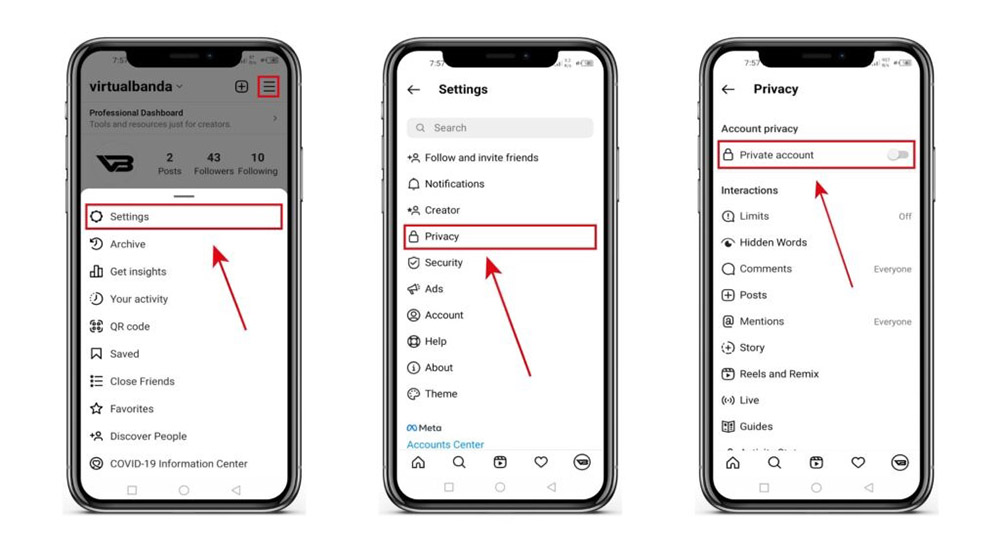
Here’s how you can set your account to private:
- Step 1: Open the Instagram app and go to your profile by tapping the profile icon in the bottom right corner.
- Step 2: Tap the three horizontal lines (menu) in the top right corner of your profile.
- Step 3: Go to Settings > Privacy.
- Step 4: Under the “Account Privacy” section, toggle on Private Account.
Once your account is private, only your followers will be able to see your follower list. Anyone who doesn’t follow you will not be able to view your followers or the people you follow.
2. Remove Unwanted Followers
If you have a public account but want to hide your followers from certain users, you can remove them from your followers list. Removing someone will prevent them from seeing your posts, stories, and your followers list.
Here’s how you can remove a follower:
- Step 1: Go to your profile and tap Followers.
- Step 2: Find the follower you want to remove.
- Step 3: Tap the three dots next to their name and select Remove.
The user will no longer be able to see your content or follow you unless you choose to accept them again.
3. Block a User
Another way to prevent someone from seeing your followers or following list is to block them. Blocking someone ensures that they can’t access your account at all.
Here’s how you can block someone:
- Step 1: Go to their profile.
- Step 2: Tap the three dots in the top right corner.
- Step 3: Select Block.
Blocking a user not only hides your followers list but also prevents them from viewing your posts, stories, and interacting with you on Instagram.
4. Use Close Friends for Stories
If you want to limit who sees your Instagram Stories, you can create a list of Close Friends. Only those you add to this list will be able to view your Stories, even if your followers list is public.
Here’s how to use Close Friends:
- Step 1: Open your profile and tap the three horizontal lines in the top right corner.
- Step 2: Go to Close Friends.
- Step 3: Add the people you want to share your Stories with.
- Step 4: When posting a story, you can choose to share it with just your Close Friends.
This feature doesn’t directly hide your followers list but allows you to control who can see specific content, like stories, without affecting your overall privacy settings.
Alternative Ways to Control Who Sees Your Instagram Content
If you’re looking to maintain privacy while still being active on Instagram, consider these additional tips:
- Turn Off Activity Status: Disable the “Activity Status” feature to prevent others from seeing when you are online. Go to Settings > Privacy > Activity Status and toggle off the feature.
- Hide Likes and Views: Instagram now allows users to hide the number of likes and views on posts. Go to Settings > Privacy > Posts and toggle off Hide Like and View Counts.
- Manage Interactions: You can also limit interactions by controlling who can comment on your posts. In the same Privacy section, you can choose to allow comments only from people you follow or block specific people from commenting.
FAQ’s
1. Can I directly hide my followers list on Instagram?
No, Instagram doesn’t offer a feature to directly hide your followers list. However, you can set your account to private, remove followers, or block users to control who sees your followers.
2. How do I set my Instagram account to private?
Go to your profile, tap the menu in the top right, select Settings > Privacy, and toggle on Private Account. This will limit who can see your followers list.
3. What happens when I remove a follower on Instagram?
When you remove a follower, they will no longer be able to see your posts, stories, or your follower list unless you accept them again.
4. How can I block someone on Instagram to hide my followers list?
To block someone, go to their profile, tap the three dots in the top right, and select Block. This will prevent them from accessing your content and followers list.
5. What is the Close Friends feature on Instagram?
The Close Friends feature allows you to share Instagram Stories with a select group of people. This helps control who sees your stories, even if your followers list is public.
Conclusion
While Instagram doesn’t provide a direct way to hide your followers list, there are several ways to protect your privacy, such as setting your account to private, removing followers, blocking users, and using Close Friends for specific content. These methods allow you to control who sees your followers, keeping your profile and connections as private as you need. By following these simple steps, you can enjoy Instagram with more control over your privacy. Whether you’re trying to maintain anonymity or simply reduce unwanted attention, these tools will help you create a more personalized and secure Instagram experience.